



Crypto Legacy چیست و چرا اهمیت دارد؟
کیفپولهای ارز دیجیتال متکی به بانکها یا مراجع متمرکز نیستند. اگر صاحب کیفپول — بهدلیل بیماری، حادثه یا هر رویداد غیرمنتظره — دسترسی خود را از دست بدهد، داراییها ممکن است برای همیشه غیرقابل دسترسی شوند.
Crypto Legacy این مشکل را با فراهم کردن امکانات زیر برای شما حل میکند:
- وارث مشخصی را تعیین کنید
- یک دوره عدم فعالیت را انتخاب کنید (۶ ماه، ۱ سال، یا ۳ سال)
- در صورت برآورده شدن شرایط عدم فعالیت، تمام داراییها بهصورت خودکار منتقل میشوند.
اگر در طول دورهٔ انتخابشده وارد نشوید یا فعالیت خود را تأیید نکنید، Cropty انتقال کل موجودی شما را به وارث تعیینشده آغاز میکند.
چرا آن را راهاندازی کنیم؟
- آینده خانوادهتان را حفظ کنید — داراییهایتان به کسی که به او اعتماد دارید منتقل میشود.
- هیچ واسطه قانونی لازم نیست — فرایند مستقیماً در کیف پول پیکربندی میشود.
- شرایط روشن و شفاف — شما بازه زمانی عدمفعالیت را تعریف میکنید.
- اجرای کاملاً خودکار — پس از پیکربندی، نیازی به اقدام دستی نیست.
⚠️ مهم: پس از غیرفعالسازی حساب و انتقال داراییها، این عملیات غیرقابلبازگشت است. تنها فردی را تعیین کنید که کاملاً به او اعتماد دارید.
نحوه تعیین وارث در کیف پول Cropty
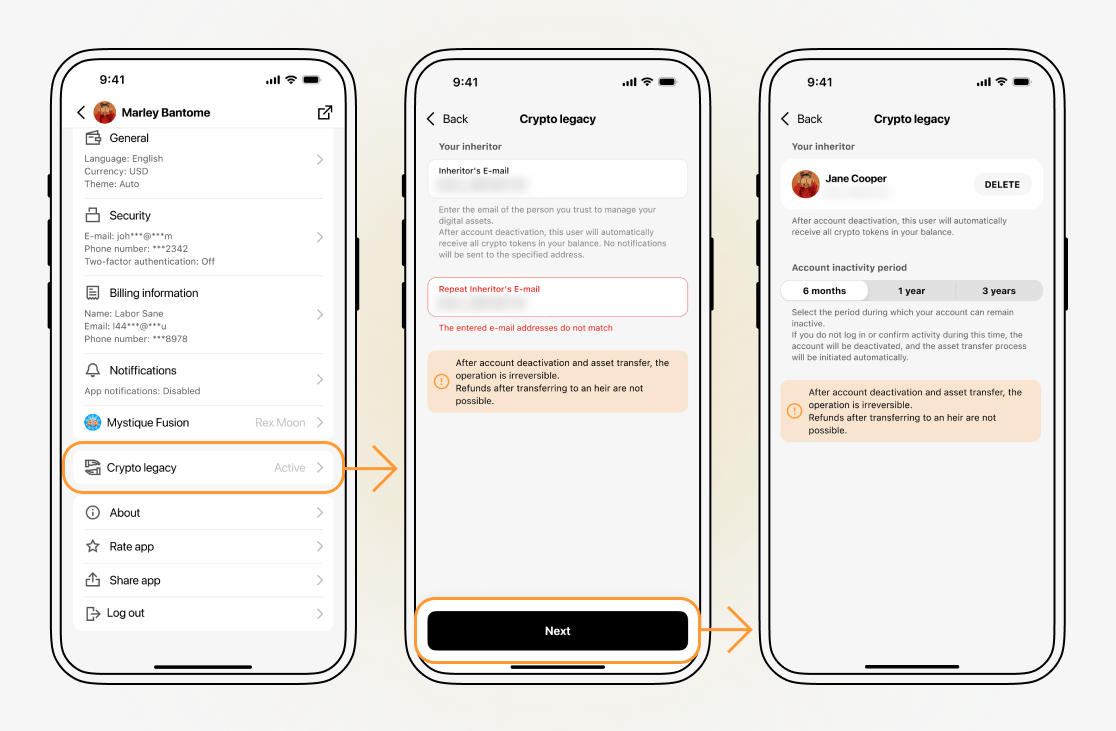
برای فعالسازی Crypto Legacy، این مراحل را دنبال کنید:
مرحله 1. بخش میراث رمزارز را باز کنید
در اپلیکیشن Cropty، به بخش Crypto Legacy بروید. در صفحهٔ معرفی، مروری بر خلاصهٔ ویژگیها انجام دهید و برای شروع راهاندازی روی Continue ضربه بزنید.
مرحله 2. آدرس ایمیل وارث را وارد کنید
در فیلد «ایمیل وارث»، آدرس ایمیلی که به آن اعتماد دارید وارد کنید. برای تأیید صحت، همان آدرس ایمیل را در فیلد «تکرار ایمیل وارث» وارد کنید.
در این مرحله، هیچ اعلانی به آدرس ایمیل مشخص شده ارسال نمیشود.
مرحله ۳. دوره عدم فعالیت را انتخاب کنید
مدتزمانی که حساب شما میتواند غیرفعال بماند را انتخاب کنید:
- ۶ ماه
- ۱ سال
- ۳ سال
اگر در طول دورهٔ انتخابشده هیچ ورود یا تأیید فعالیتی رخ ندهد، سیستم حساب را غیرفعال در نظر میگیرد و فرآیند انتقال را بهصورت خودکار آغاز میکند.
مرحله ۴. بازبینی و ذخیره
لطفاً ایمیل واردشده و دورهٔ غیرفعالی انتخابشده را دوباره بررسی کنید. در صورت نیاز میتوانید وارث را با استفاده از دکمهٔ DELETE حذف کرده و وارث دیگری وارد کنید.
پس از ذخیره، Crypto Legacy تحت شرایط انتخابشده فعال میشود.
نحوهٔ انجام فرآیند انتقال
پس از پایان دورهٔ عدم فعالیت انتخابشده:
- سیستم شرایط عدم فعالیت را بررسی میکند.
- حساب کاربری شما غیرفعال شده است.
- تمام داراییهای رمزارزی در حساب شما به وارث تعیینشده منتقل میشوند.
این فرآیند پس از تکمیل قابل بازگشت نیست.
راهنمای سریع
Crypto Legacy در Cropty چیست؟
قابلیتی که در صورت غیرفعال ماندن حساب شما برای مدت زمان انتخابشده، داراییهای رمزارزیتان را به وارث تعیینشده بهصورت خودکار منتقل میکند.
چه کسی داراییها را دریافت میکند؟
شخصی که آدرس ایمیل او را در تنظیمات Crypto Legacy مشخص کردهاید.
انتقال چه زمانی انجام میشود؟
پس از سپری شدن دورهٔ عدم فعالیت انتخابشده (۶ ماه، ۱ سال یا ۳ سال) بدون ورود یا تأیید فعالیت
آیا انتقال قابل بازگشت است؟
خیر. پس از غیرفعال شدن حساب و انتقال داراییها، این عملیات غیرقابلبرگشت است.
آینده دیجیتال خود را ایمن کنید
اگر ارز دیجیتال نگهداری میکنید و میخواهید مطمئن شوید که در مواقع اضطراری یک شخص مورداعتماد به آن دسترسی داشته باشد، در اپلیکیشن Cropty قابلیت Crypto Legacy را فعال کنید.
راهاندازی آن تنها چند دقیقه طول میکشد — و از ثروت دیجیتال شما در درازمدت محافظت میکند.